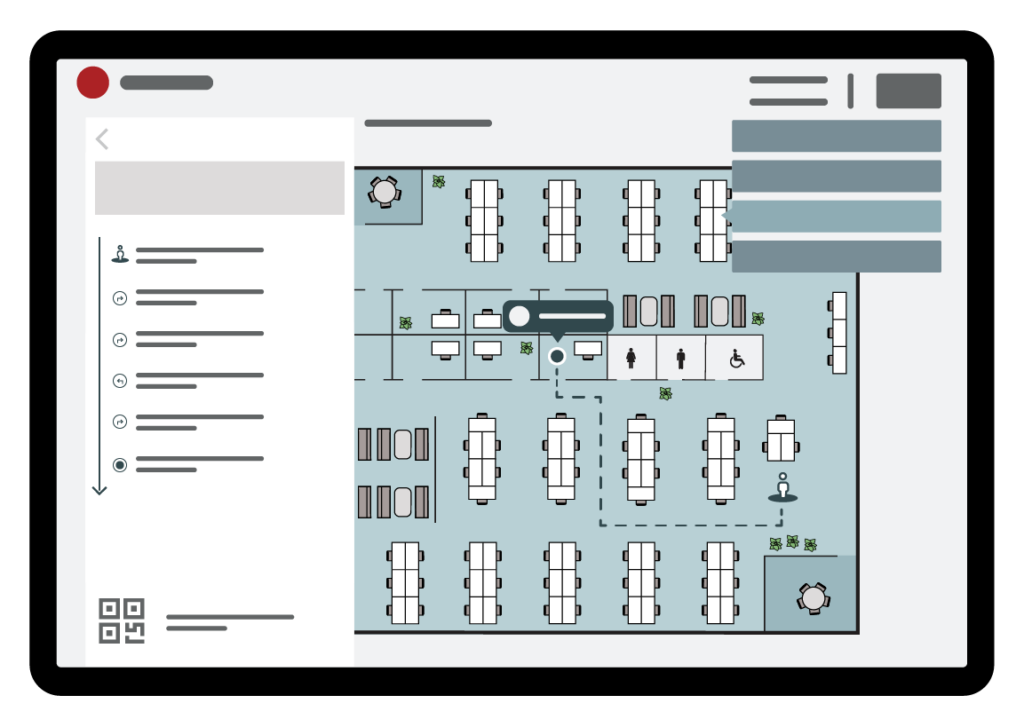
The OfficeBooking Wayfinding kiosk is a self-service device that helps visitors and registered users find their way to rooms and facilities in the building. With the Pathfinding module, users can request a route and transfer it to their mobile phone by scanning a QR code. The kiosk offers several features, which are described below.
Customize the kiosk to your needs
The kiosk can be set up depending on your needs. As a full Wayfinding kiosk, users can see which rooms are available or occupied and book a room directly. Combined with the Who’s at Work module, users can also see where a colleague has booked a workspace today and request a route to that location. Or, the kiosk can be used purely for requesting routes to rooms and facilities.
Find your way around the building
Users can search by room name, facility or category, such as meeting rooms, restrooms or printers. With a single tap on a category, all matching locations are shown on the map at once, for example all restrooms in the building.
Route to your destination
When a route is requested, a route description is shown and the route is drawn on the map. Routes are always calculated using only the available paths in the building. For routes that span multiple floors, the Level switch button lets users change floors and view the remaining part of the route on the corresponding level.
Continue your route on your mobile phone
Users can scan the QR code to view the complete route on their mobile phone. The QR code opens a link in the phone’s web browser, showing the route as a dotted line to the destination. No app download is required.
Safety information
The kiosk also shows the location of safety facilities, such as emergency exits, AEDs and assembly points, so users can quickly find them when needed.